Blog
Welcome


Recent posts
SEARCH RESULTS FOR: Photojunction Retro
We sincerely apologise to those of you that have been affected by the current errors occuring when designing Flushmount albums in Photojunction. For those of you that wish to have a full bleed image on the page after a translucent title you will be encountering an error that stops you from proceeding. We are aware of the problem and are working on a solution in Photojunction. In the meantime we have two options for getting around this issue: • Either drop the image onto the layout and physically drag the image to the edges or; • Instead of selecting the title option, leave a note in the special To View More >>
This entry was posted in , by Admin
Everyone has a different workflow, there's no question about it. Most wedding photographers have a shooting season and…the rest of the year. Depending on your clients, album design could be year round, but if you're lucky, you finish your album season shortly after your shooting season. The "downtime" is used for maintaining your business, small shoots, networking, and maybe taking it easier. One of the most important things to take care of during this time is organizing and backing up files. I 'm afraid album files get forgotten sometimes. I can't stress enough, you should back up your files. To View More >>
This entry was posted in by Admin
Things have a habit of creeping up on you, as our friends at Seldex have reminded us by sending an email to their clients reminding them that come July they won't be able to use Photojunction's cover design and Send Order functions. (We announced as much here back in February.) We've counted Seldex as friends for years – in fact they sold Queensberry albums in Australia back in the day! - so this is a rather sad time, the culmination of a process that started to unfold a couple of years ago when we realised that most suppliers weren't going to support PJ as a universal album design tool, which To View More >>
This entry was posted in by Admin
Remember the very first time you sent a letter? (Or for those who have never posted a letter - sent an email?) There were doubts - would it get there? Would strangers look at it in transit? Did I have enough postage? Did I have the right address? Do I trust the postie to take great care of my efforts? The same goes with sending orders to Queensberry through Photojunction for the first time. We need assurances that I know, as a very regular user, become less relevant with experience. Photojunction has many 'safety' features to prevent people from mucking up their orders. These safety features exist To View More >>
This entry was posted in by Admin
I have taken up a temporary position helping out with the Photojunction support team. One thing that I have noticed is that people seem to have more problems with the mechanics of Photojunction not fitting into their own experience or habits. Hardly ever does anybody ask for design advice. I wonder if it is the same with photography. People will ask about technical things like lighting and composition but much less often about content and emotion. ARE WE TOO SHY? I don't think so! As photographers we are called upon to be the creative voice for our clients. Is it that we don't like to ask for help? To View More >>
This entry was posted in by Admin
Wading through our "how-to" posts was quite a job. Trying to single out the best was just as difficult, but worth the effort. Here are my favourites. Hopefully you'll find them handy when dealing with Queensberry and Photojunction, and evaluating your own workflow... There's so much good stuff in the Smooth Sailing series I reckon you should check them all, but here are a few: Photo Front covers (easy peasy) - If designing Photo Front covers sounds hard. It's not. Here's how to easily do it. What can delay your orders? - Here are a few simple things that frequently delay people's orders (long To View More >>
This entry was posted in by Admin
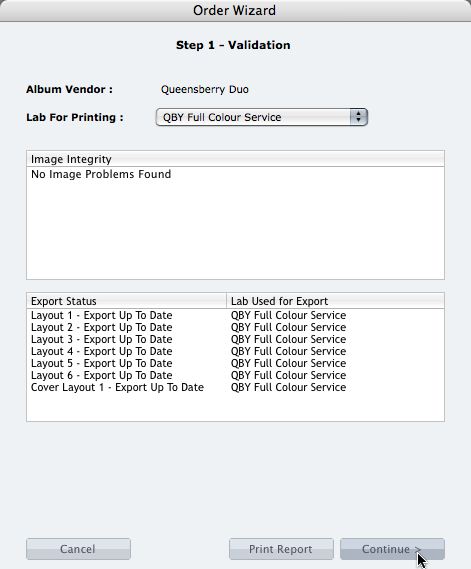
We're describing the perfect way to send us your print-and-bind order... After exporting your files you definitely shouldn't jump straight to LabFTP and send us the files - we wouldn't know what to do with them! Instead, always use the Remix Order Wizard. (You'll find it under the Album menu). Remix will validate your order and create an order "bundle" that contains everything we'll need to process your order - provided you follow these instructions: 1. Run your order through the Send Order Wizard. You'll find a tutorial here. The Wizard will ask what service you want (eg Print & Assemble) To View More >>
This entry was posted in by Admin
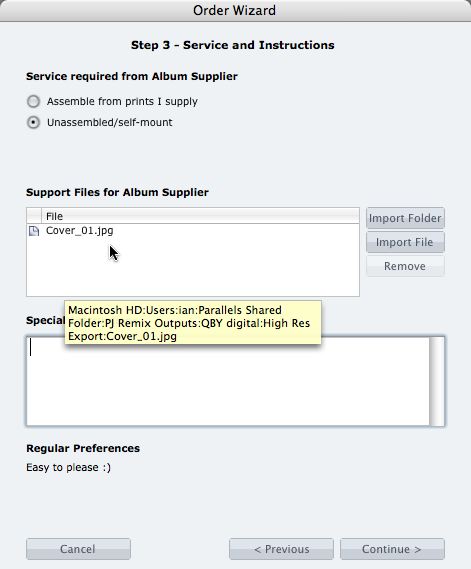
What if you want us to print your cover image, but nothing else? 1. When you fire up the Remix Order Wizard , choose either the "Assemble From Prints Supplied" or Don't Assemble" option. 2. On the same screen the Wizard will offer a place to include "support files" for your album supplier. Open your folder of High-Res Export files and drag in a copy of the cover image (don't double up by sending it to your lab to print as well). 3. Remix may ask you if you want us to print the cover image (generally it'll be obvious what you want, in which case Remix won't ask). Be sure to say Yes. 4. When the To View More >>
This entry was posted in by Admin

Cover layout design in PJ Remix Here are the first steps in preparing a perfect, hassle-free print-and-bind order, really fast. 1. First, upgrade to PJ Remix. If you have already, thank you. 2. Use Remix to design your cover as well as your page layouts. You'll get to frame and crop the cover image yourself, see exactly what it looks like and be sure that it looks good. For example, here you can see how much of the image in the photo front cover layout above has been cropped away. No problem in this case, but many images won't be suitable: 3. Export your cover AND page layouts using Remix's Export To View More >>
This entry was posted in by Admin
Photojunction has changed so much during the year that we're going to build a brand new series of five minute (give or take) classroom demo movies, and we'd like you to be involved. The plan is to record the movies live during a webinar. We'll intro and close each separate five minute movie so we can easily chop the recording up afterwards, but you'll still be able to ask questions. We'll fit as many 'mini movies' into the hour as we can. For the first one, here's what we'll be gunning to get through: Start here! (Photojunction overview) Download and set up Photojunction Start New Project (begin To View More >>
This entry was posted in by Admin
Email: info@queensberry.com
Free Phone Numbers:
New Zealand: 0800 905 905
Australia: 1800 146 251
USA: +18668350851
UK: 0800 808 5271
Canada: +1 855 581 0370